Hello, my name is Nolan Kolb (@themoonwalker8692 on Discord), and I am the Team Leader for the Game Dev Team!
Before continuing with this doc, please read the General Onboarding Document.
What We Do
Section titled “What We Do”The Game-Dev team is responsible for designing, architecting and programming various game & game-related codebases.
Persona 3 Dual is the actual game itself, developed in C++. The game itself is built with our in-house aegis-engine. At the moment, we use BlocksDS as our SDK. To interact with DS hardware, we use the libnds library.
Aegis Engine is a lightweight, strictly-bounded C++17 Entity-Component (EC) and Data-Oriented Design (DOD) hybrid game framework. For more info on the engine, read the Game Engine HLD.
P3D Amicitia (a fork of Amicitia) is an editor for file formats used in Atlus' Persona games, modified by member(s) of the P3D team in hopes of an easier workflow
Contributions
Section titled “Contributions”Before contributing, please read our Git Guidelines. Any contributions that do not follow these guidelines will NOT be accepted!
The process of assigning tasks is self-directed. You'll need to select a task from the GitHub Project Board under “Ready” & assign yourself. Sometimes, team leads will ask you to do some issues as well.
Once you have finished, please share photos/videos/PR of the completed issues to the #game-dev-lounge for feedback. Once we've given the OK, you can upload the files to the Game Dev team’s folder in Google Drive if relevant.
Make sure that you strictly follow the Roadmap. If you want to work on an issue that isn’t on the roadmap, make sure you get approval from the team lead (themoonwalker8692) or the project lead (thebosst). If you want to work on an issue that IS on the Roadmap, find the associated GitHub issue! If you can’t find it, feel free to make a new issue under the “New” tab.
All new Game Dev team members must also read Game Dev Team Reference.
AI Usage Policy
Section titled “AI Usage Policy”The usage of AI tools is permitted if used responsibly, to be more precise under these conditions:
- You designed the core idea. AI can help you implement or refine it, not invent it for you.
- You understand it. If you can't explain what the code does, it doesn't belong in a PR.
- No slop. Generated code must be clean, logical, and intentional.
Tools & Setup
Section titled “Tools & Setup”Note: This setup only works for persona-3-dual and aegis-engine. p3d-amicitia dev setup is NOT covered.
The team uses melonDS for testing, VS Code as the development IDE, & Docker as the development environment.
Prerequisites
Section titled “Prerequisites”You need to have melonDS, VS Code, & Docker already installed on your system.
melonDS
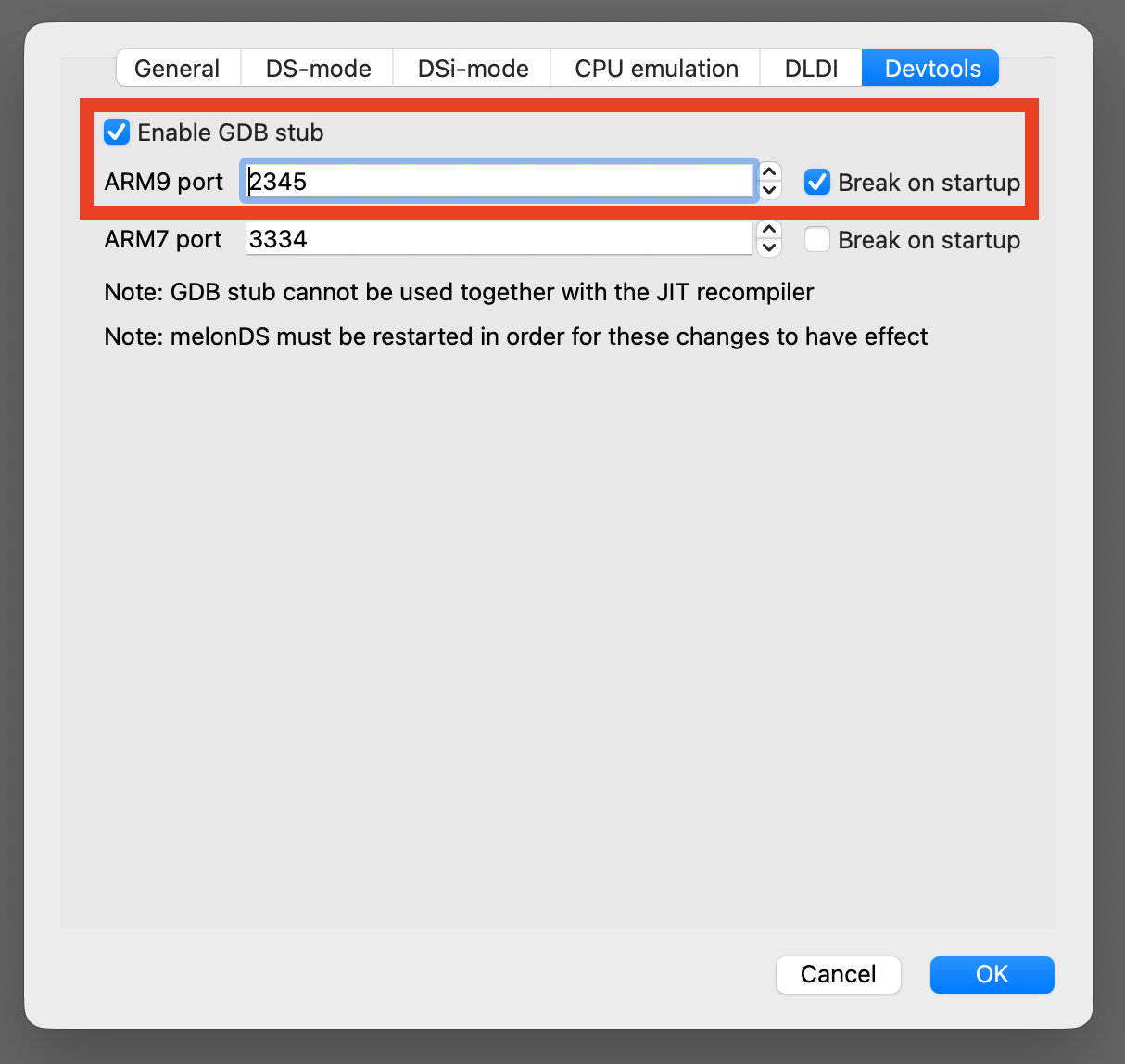
Section titled “melonDS”- Go to Config → Emu settings → Devtools
- Ensure Enable GDB stub is checked
- Ensure the ARM9 port is 2345 & Break on startup is checkedWhen debugging, ensure that melonDS is already launched
VS Code
Section titled “VS Code”- Ensure that the Dev Containers extension is installed
Docker
Section titled “Docker”- Ensure that Docker is launched & runningDocker needs to be running whenever you want to code
1. Clone the Repo
Section titled “1. Clone the Repo”persona-3-dual
Section titled “persona-3-dual”git clone --recurse-submodules https://github.com/p3d-project/persona-3-dual.gitcd persona-3-dualaegis-engine
Section titled “aegis-engine”git clone --recurse-submodules https://github.com/p3d-project/aegis-engine.gitcd aegis-engine2. Set Up Code Formatting
Section titled “2. Set Up Code Formatting”This project uses pre-commit to auto-format all source files before every commit. It handles C/C++ (clang-format), Python (black + ruff), and web files (prettier).
Install pre-commit:
# macOS
brew install pre-commit# Windows / Linuxpip install pre-commitRegister the hooks:
pre-commit installThat's it. Hooks run automatically every time you run git commit.
What happens during a commit:
The hooks reformat your staged files in-place. If any file is changed, the commit is aborted so you can review the diff. Just re-stage and commit again.
Run hooks manually (e.g. before opening a PR):
pre-commit run --all-filesWindows note: prettier requires Node.js. pre-commit downloads a local copy automatically the first time you run pre-commit install or pre-commit run.
3. Open the repo in VS Code
Section titled “3. Open the repo in VS Code”Open the persona-3-dual repo in VS Code. Then, click the bottom left >< icon & select Reopen in Container
You may also see a notification on the bottom right to Reopen in Container. This method also works! If this is your first time launching the container, it may take a few minutes for Docker to install the image. Otherwise, VS Code should re-launch within a few seconds.
You are now ready to code!
Building
Section titled “Building”To build, simply use make. If you do not need to update the SD card image, use make SKIPSD=1
If this error appears
[in#0 @ 000001fea6e491c0] Format mov,mp4,m4a,3gp,3g2,mj2 detected only with low score of 1, misdetection possible!
[in#0 @ 000001fea6e491c0] moov atom not found
[in#0 @ 000001fea6e48f80] Error opening input: Invalid data found when processing input
Error opening input file C:/p3d/persona-3-dual/assets/video/base.mp4.
Error opening input files: Invalid data found when processing input
Its most likely due to non pulled LFS media. Pull it with
git lfs pullDebugging
Section titled “Debugging”Ensure melonDS is already launched & awaiting the debugger
- Build in debug mode (you can use the make debug task or just open a terminal inside the container and run make DEBUG=1)
- In VS Code, go to the Run and Debug tab on the left panel, and select [Docker] (gdb) Connect to melonDS
You are now ready to debug!
If you are unable to connect the debugger to melonDS, ensure that melonDS is launched WITH THE GAME & has the below settings configured
Writing Documentation
Section titled “Writing Documentation”Please check out our Writing Documentation section in the Game Dev Reference .
Quick Links
Section titled “Quick Links”Repositories
Section titled “Repositories”Assets
Section titled “Assets”For more technical documentation, check out the links section from the Game Dev Team Reference. All docs can be found on this docs.p3dual.com, which pulls files from p3d-docs and the shared P3D Project - Team Google Drive
Questions
Section titled “Questions”If there are any questions, ping Game Dev lead @TheMoonWalker8692 on Discord in the #team-general or #game-dev-lounge channel depending on the question. Alternatively, @thebosst can be pinged if the former is not reachable.